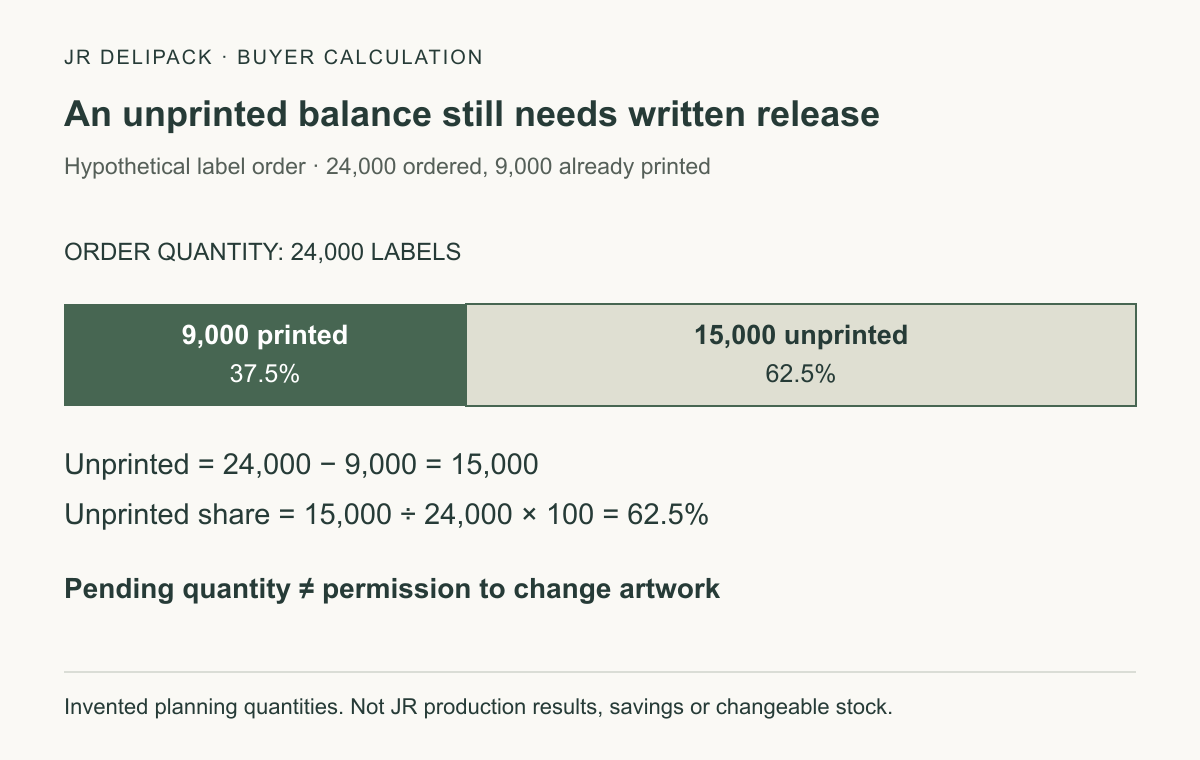
Control artwork changes by tying each approved file to the exact packaging specification, order line and production lot: in a hypothetical order for 24,000 labels with 9,000 already printed, 15,000 labels—or 62.5%—remain unprinted, but none should switch versions without written release. These are invented planning quantities, not JR DELIPACK production results; the unprinted balance is not automatically changeable stock or a savings figure.
An artwork approval should answer a practical purchasing question: which design is authorized on which component in which shipment? A filename ending in “final” cannot answer that alone. This guide preserves the link between the design, the physical packaging and the order while giving buyers a workable method for revisions, first-article checks and reorders.
What exactly is being approved?
Define the approval object before asking anyone to sign. A logo file, a flat label layout, a printed label roll and a label applied to a container are different objects. Approval of spelling in a PDF does not also approve placement, color reproduction, adhesion or the finished package. Mark the scope of each decision so that a limited design review cannot be mistaken for an unrestricted production release.
Record the selected container and, where relevant, its base and lid separately. Include the material, component code, drawing revision, decoration location and proposed printing or labeling method. If the design extends across more than one component, review the assembled package as well as the separate files. Do not infer a printable area from a product-family photograph or from another size with a similar appearance.
Place this decision inside the B2B food-container purchasing guide. Agree who can approve content, reproduction and production release; the sourcing responsibility checklist helps coordinate separate suppliers. This is an agreed workflow, not a rule that transfers all legal responsibility to one party simply because that party signed a proof.
How do direct printing and applied labels change the review?
For direct printing, request the proposed process, substrate, decoration area and proof arrangement. Identify any separate plate or tooling commitment before approving expenditure. Ask which features can be evaluated digitally and which need a sample made with the intended production method. Do not assume that a printed mark is permanent, abrasion-resistant or suitable for a particular use just because it is not an applied label.
For applied labels, review the printed label and its position on the actual finished component. Include label stock, adhesive specification, orientation, edge clearance and the conditions in which the packaging will be handled. A change to the container surface or label construction should trigger a review of the affected approval, not a silent carryover of the previous sample. Whether a change is easier or cheaper depends on the commitments already made.
Keep a distinction between a demonstration mock-up and a production-representative sample. A hand-positioned paper label can help a team discuss appearance, but it does not establish the performance of a different adhesive or an automated application process. Write down what the sample represents, what remains unresolved and which follow-up evidence is required. This avoids both unnecessary testing of irrelevant features and premature approval of untested ones.
| Proposed decoration | Approval object to identify | Question to settle before release |
|---|---|---|
| Direct print on a container or lid | Exact component, file revision and process-specific proof | Which color and placement criteria will the production sample be compared against? |
| Separately printed applied label | Label construction plus the labeled finished component | Are position, surface compatibility and intended handling conditions covered? |
| Artwork across a base and lid | Component files plus the assembled configuration | Does the intended view remain correct when the actual package is closed? |
| A change of material or finish | Revised specification and the affected proof | Which previous approvals remain applicable, and which need to be repeated? |
What can a digital proof establish—and what can it not?
Adobe's Output Preview documentation explains that a PDF can be checked for color separations, ink coverage and certain overprint effects. It also states that on-screen separation previews do not verify every production setting and directs users to their print provider for appropriate proofs. Use these tools for their stated purpose; a screen preview is not evidence of adhesion, rubbing resistance or finished-container performance. 1: Adobe output-preview guidance · reference details
Ask the designer and printer to identify the file format, page dimensions, dieline revision, fonts and image requirements they will use. Keep the editable source separate from the released production file, but link them in the approval record. If the printer changes the file to make it producible, return the changed proof for review rather than assuming that a technical adjustment cannot affect visible content.
Agree a color reference and comparison method suitable for the selected process. Record the sample identification, lighting arrangement and any agreed tolerance rather than writing only “match the screen.” When color or placement is disputed, compare the same agreed references under the same conditions. Do not invent a universal color tolerance or treat a phone photograph taken under different lighting as a calibrated measurement.
For small or curved surfaces, assess the actual reading position. Check whether text, symbols and artwork remain visible when the lid is fitted and the package is handled as intended. If the proof is flat, explicitly leave curved-surface placement unresolved until an appropriate sample is reviewed. A full-size printout can support a layout discussion without being presented as a substitute for that remaining check.
How should barcodes and food-contact questions be separated from appearance?
If a UPC barcode is part of the approved design, GS1 US advises using suitable high-resolution artwork and printing, protecting the clear areas beside the symbol and considering its location on the package. Its guidance also warns against casual resizing or truncation. Confirm the applicable symbol and scanning environment; do not assume every barcode type has identical layout requirements. 2: GS1 US placement and printing guidance · reference details
In the approval sheet, separate the encoded information from the printed symbol. Have the authorized product-data owner confirm what the identifier represents, and agree who will evaluate the produced mark and retain the result. A successful phone scan is useful feedback but should not be substituted for whatever verification the receiving retailer or distribution operation actually requires. Request those requirements rather than inventing a pass grade in the purchase order.
For EU food-contact applications within its scope, Annex A of Regulation (EC) No 2023/2006 addresses inks on the non-food-contact side, including transfer through the substrate or by set-off during stacking. It also states that the printed surfaces must not contact food directly. This is a scoped legal requirement, not evidence that a particular JR DELIPACK item is compliant. 3: EUR-Lex, GMP regulation, Annex A · reference details
Therefore, ask for the applicable decoration and food-contact evidence for the actual configuration and destination market. A visually acceptable logo does not settle that question, and an undecorated material report should not be assumed to cover every ink, adhesive or finished construction. Use the document-review process to identify evidence gaps without publishing confidential source-factory documents. Seek qualified market-specific advice where the requirement is unclear.
Which records should connect the file to the production order?
Use a revision identifier that remains unchanged after approval. Pair it with the approved file, proof date, reviewer, scope of approval and relevant sample identifier. The order line should name that revision and the packaging configuration, not merely the product name. Ask the supplier to acknowledge the same identifiers before release. A mismatch between the purchase order and proof should be resolved explicitly, not by choosing whichever attachment arrived most recently.
Archive superseded versions with their approval history, but remove them from the active production set. Retention supports investigation; unrestricted availability on the production hand-off does not. Distinguish “superseded for new orders” from “authorized for this already released lot.” The old revision may still have a documented purpose even though it must no longer be selected by default.
Choose one person or role to assemble the release record after the necessary specialist reviews. That coordinator should not override an unresolved content or technical objection. Record conditional approvals as conditions, including the person responsible for closing them. An email saying “looks good” should not silently become authorization for an altered substrate, an additional language version or a later order quantity.
Keep shipment-level identification understandable to receiving staff. If one purchase order legitimately includes different approved artwork versions, agree how the packing list, cartons or other appropriate records distinguish them. Do not rely on staff remembering the chronology of a design discussion. The objective is to locate affected goods accurately if a question arises, not to add identifiers that nobody uses.
How can buyers calculate the scope of a mid-order revision?
Start with counted status, not an assumption that the entire order is still available to change. In the opening example, the assumed order is for 24,000 labels, of which 9,000 have been printed. Subtraction gives an unprinted balance of 24,000 − 9,000 = 15,000 labels. Dividing that balance by the order quantity gives 15,000 ÷ 24,000 × 100 = 62.5%. The unit throughout is labels, not cartons, containers or saleable meals.
This calculation establishes only a planning boundary. It says nothing about plates already made, booked capacity, material commitments or whether production stopped when the change request was sent. Ask the supplier to confirm quantities at an agreed cut-off time and acknowledge any hold. If the status changes before acknowledgement, reconcile the new quantities before deciding which revision can apply to the remaining work.
Suppose, within the same invented example, that 3,000 of the printed labels have already been applied and 6,000 remain unapplied. Those groups reconcile to the 9,000 printed total. They should not automatically receive the same disposition: the applied group concerns finished components, while the unapplied group concerns label inventory. Neither group can be described as scrap, reusable or reworkable until the relevant content, technical and commercial decisions are made.
List the alternatives with their actual supplier-confirmed effects: continue an approved revision where permitted, hold identified stock, qualify a rework proposal, or produce a replacement. Request quantities, additional charges, lead-time consequences and authorization for each option. Do not calculate a saving from unit price alone while omitting unusable stock, extra handling or an unresolved compliance issue. No financial outcome is claimed by this example.
What should happen at first article, discrepancy review and reorder?
Agree when a production-representative first article will be checked and who can release the next stage. Compare it with the approved references for content, orientation, placement and the agreed color criteria. Record the actual sample identity and observations. A photograph can help locate a defect, but it should be labeled as supporting evidence rather than being treated as proof of every physical or functional requirement.
If something differs, describe the discrepancy before assigning a cause. Identify the approved reference, the observed sample, the affected feature and the criterion that was not met. Request a response covering the affected quantity and proposed action. Preserve relevant approved and disputed samples where practical. Do not replace the approved master retrospectively merely to make an unexpected result appear acceptable.
For a reorder, reconfirm the active artwork revision and any changes to the component, substrate or decoration process. Carrying forward a previous order number is not enough if its approval had limits. Ask whether earlier proofs remain representative and which changes require renewed review. Keep this artwork check distinct from a broader specification-control review; not every packaging change is an artwork change, and not every artwork change changes the container itself.
A practical release checklist
- Match the order line to the exact component, drawing and artwork revision; resolve inconsistent identifiers before release.
- Record the approved content reviewer and the agreed technical review responsibilities, including market-specific questions.
- Identify the digital proof, relevant physical reference and acceptance criteria; list anything the proof does not establish.
- Confirm barcode requirements and decoration-related evidence separately from visual appearance where they apply.
- Obtain an acknowledged production status and written cut-over instruction when a revision affects work already committed.
- Retain the change record and receiving identification so the shipped version can be traced without searching informal messages.
Treat this as a proposed purchasing checklist, not a certification system. Adapt the approval steps to the configuration and risk with the supplier and relevant specialists. A field should be marked not applicable only with a reason; an unanswered question should remain visibly unresolved rather than acquiring a default approval.
Frequently asked questions
Can artwork change after an order is placed?
Possibly, but first obtain the order's actual production status and a written change proposal. Identify what is already committed, what can be held and which approvals need repeating. Agree the new revision and affected quantities before release; an emailed replacement file alone does not establish that the production instruction changed.
Who should approve artwork accuracy?
Agree the responsible content, technical and commercial reviewers in the project. The buyer's authorized content owner can approve supplied wording while the printer confirms reproduction requirements. That working allocation does not replace legal duties or permit either party to assume that someone else reviewed an unresolved claim.
What belongs in an artwork approval record?
Include the file revision, exact packaging configuration, approval date and reviewer, scope, proof references, order line and production acknowledgement. Keep unresolved conditions visible. Retain superseded records for traceability while preventing their accidental selection as the active instruction.
How can an old version be kept off a reorder?
Name the authorized revision on the new order and obtain a matching acknowledgement. Check whether component or process changes affect previous approval. Archived artwork can remain available for investigation without being available as an unqualified production choice.
Does a different material require a new color review?
Review the affected approval rather than assuming transferability. Ask whether the old proof represents the new substrate, finish and process, and agree the necessary comparison. A decision to retain an approval should have a documented basis, not simply a familiar logo or product name.
How should a label on a curved container be checked?
Inspect the proposed label on the selected finished component. Review position, edges, wrinkles and readability from the intended viewing position. Record the conditions and any unresolved adhesion or handling questions. A flat proof answers layout questions but does not establish the result of that applied-label review.
What if the printed sample differs from the digital proof?
Compare both against the agreed reference and criteria, and identify the precise discrepancy. Clarify whether the issue concerns content, file preparation, reproduction or the reference itself. Obtain a documented decision before releasing affected work; do not assume either that every difference is acceptable or that every difference means the whole order is unusable.
Discuss the packaging and artwork together
JR DELIPACK supplies PP, PLA and paper-based foodservice packaging with supply and manufacturing support. The product range provides family context; the available decoration method, selected model and evidence scope require confirmation for the particular enquiry. Review the factory and quality information without treating general background as approval of a printed SKU.
Send the component specification, intended use, destination, quantities and current artwork status through the contact page. Ask for the proposed proof arrangement and change boundary before committing to decoration. Confidential source documents should remain in the appropriate controlled review channel.
References
- Adobe. Preview output (Acrobat Pro). Updated February 26, 2026. Accessed October 6, 2026. PDF preview capabilities and limits; not a food-packaging performance standard. Return to citation.
- GS1 US. Barcode Placement & Printing Guidelines. Publication date not provided. Accessed October 6, 2026. UPC artwork, printing and placement guidance; verify applicability to the chosen symbol. Return to citation.
- European Commission, via EUR-Lex. Commission Regulation (EC) No 2023/2006 of 22 December 2006 on good manufacturing practice for materials and articles intended to come into contact with food, Annex A. Consolidated version March 16, 2025, accessed October 6, 2026. The consolidation is a documentation aid; authentic acts are linked within it. Applies within the regulation's scope, not as a product certification. Return to citation.
“How Can Buyers Control Artwork Changes on Food Packaging?”的一个回复